MMX Telegram Software Tutorial 2: System Parameter Settings

TELEMMX Team
2026-07-23 01:36:33
About 6 min read
34 views
MMX Telegram Software Tutorial 2: System Parameter Settings

1. Basic Settings & Behavior Options

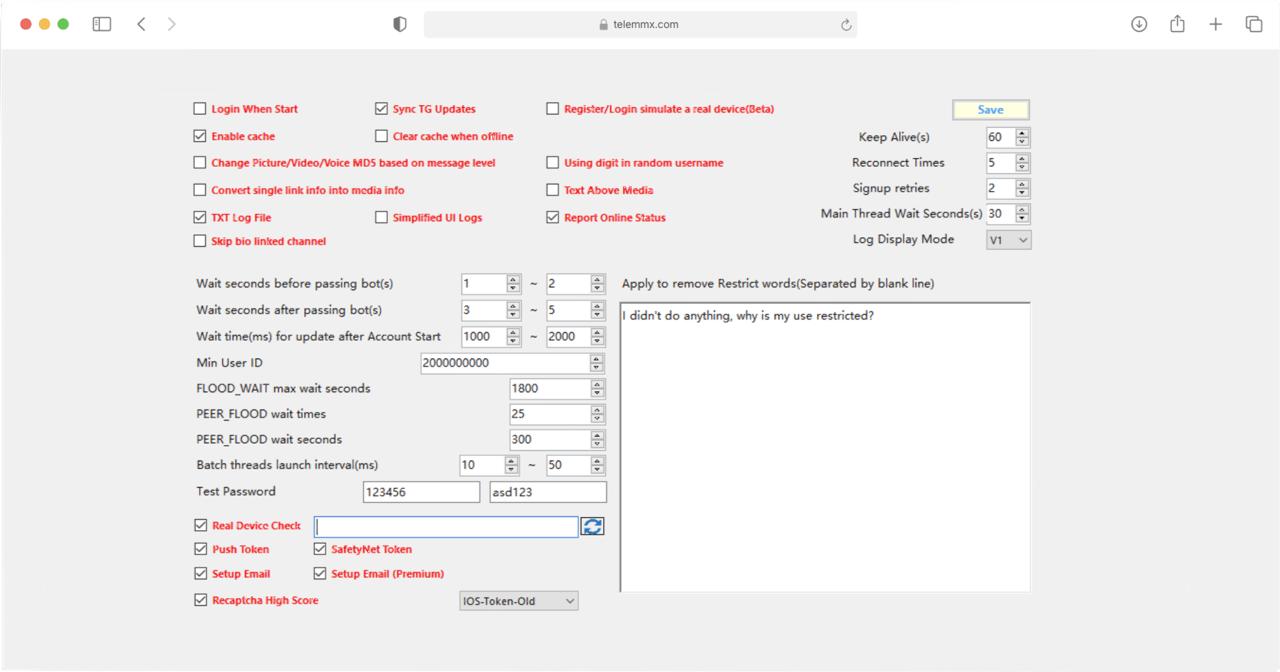
  • Auto Login on Startup: Automatically reads saved credentials and attempts to log in when the program starts.
  • Sync TG Updates: Automatically receives and syncs the latest data or update status from Telegram.
  • Simulate Real Device on Registration/Login (Beta): Simulates fingerprint parameters of real mobile devices during login or registration to enhance environment authenticity.
  • Enable Cache: Enables local data caching to reduce repeated requests and improve response speed.
  • Auto Clear Cache on Logout: Automatically clears locally generated cache files when the account logs out or goes offline.
  • Change Image/Video/Voice MD5 Based on Message Level: Automatically alters the file's Hash/MD5 value when sending media files to prevent duplicate submission detection.
  • Random Username Includes Numbers: Appends random digit combinations when auto-generating account usernames.
  • Convert Single Link to Media Info: Automatically converts a single URL into a rich media preview card format.
  • Message Text Above Media: Adjusts message rendering layout to place text above images or videos.
  • TXT File Log: Saves system runtime logs to a local .txt file in real time.
  • Minimize Interface Log: Reduces the output frequency in the interface log box to optimize performance.
  • Report Online Status: Continuously sends heartbeat signals to the server to maintain the account's online status.
  • Skip Bio-Linked Channels in Bulk Sending: Automatically filters and skips channels referenced in the profile when sending batch messages.

2. System Connection & Network Parameters

  • Keep Alive(s): Interval for sending heartbeat packets to maintain connection (default 60 seconds).
  • Network Retry Count: Maximum number of automatic reconnection attempts on network timeout or disconnection (default 5).
  • Registration Retry Count: Number of retries when account registration fails (default 2).
  • Main Thread Wait Time (seconds): Base pause time between main task nodes (default 30 seconds).
  • Log Output Mode: Sets the format standard or protocol version for logging (default: V1).

3. Automation & Delay Control

  • Pre-Bot Check Wait Time (seconds): Random delay before triggering and responding to bot verification (e.g., 1-2 seconds).
  • Post-Bot Check Wait Time (seconds): Delay after completing bot verification before proceeding (e.g., 3-5 seconds).
  • Post-Login Update Wait Time (milliseconds): Time to wait for data sync after successful login (e.g., 1000-2000 ms).
  • Minimum User ID: Lower limit for filtering target user IDs (e.g., 2000000000).
  • Batch Thread Start Interval (milliseconds): Random interval between starting sub-threads in multi-threaded tasks (e.g., 10-50 ms).

4. Rate Limiting & Risk Control (Flood Control)

  • FLOOD_WAIT Max Wait Time (seconds): Maximum allowable pause when Telegram triggers FLOOD_WAIT (default 1800 seconds, i.e., 30 minutes).
  • PEER_FLOOD Retry Count: Maximum number of retries when encountering peer flood restrictions (default 25).
  • PEER_FLOOD Wait Seconds: Cooldown time before the next retry after a peer flood restriction (default 300 seconds).

5. Environment Verification & Unban Appeal Settings

  • Real Environment & Token Verification: Includes real device verification, Push Token, SafetyNet Token, and Setup Email for configuring device authentication and protocol interaction parameters.
  • Recaptcha High Score: Configures high-score Recaptcha verification scoring mechanism.
  • Protocol Selection: Dropdown menu to select client protocol version (currently set to IOS-Token-Old).
  • Test Passwords: Passwords attempted during batch registration for system or account verification (e.g., 123456 / asd123).
  • Unban Appeal Text: English template for submitting an appeal when an account is restricted or banned (e.g., "I didn't do anything, why is my use restricted?").
Tags MMXMammothTelegramSystem SettingsTutorial

Start Your Telegram Automation Journey

TELEMMX — All-in-one multi-account solution to automate customer acquisition, lead interception, and account nurturing

Free Services